Instagram Reels safe zone
Keep the hook visible after Instagram adds the interface.
The file is 1080×1920. The usable canvas is smaller. This guide marks a conservative centre area for essential text and explains when a face, subtitle or cover needs a different decision.
No card to upload, transcribe, style and preview. Export starts on Creator.
- working canvas
- 1080×1920
- conservative top reserve
- 14%
- conservative bottom reserve
- 20%
Workflow
From spoken clip to post-ready video
- 01
Import the overlay
Place the SVG above the edit at 1080×1920 and lock the layer.
- 02
Protect essentials
Keep the main claim, face and CTA inside the clear central area.
- 03
Check the right rail
Leave room for like, comment, share and profile controls.
- 04
Disable before export
Use the overlay as a guide only; it must not appear in the final video.
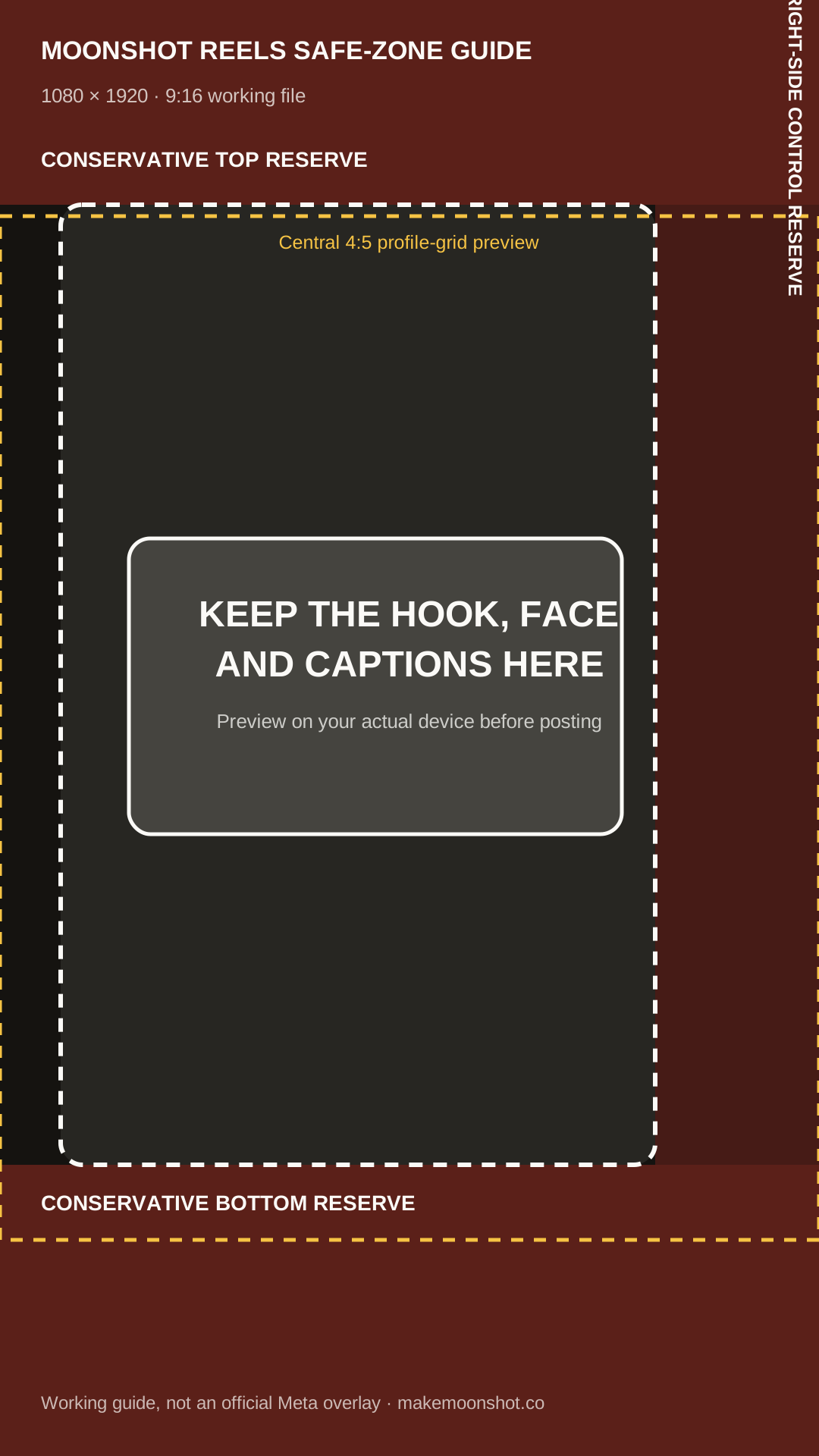
A practical 1080 × 1920 working file
Keep the essential hook, face and captions inside the central guide. The shaded bands are conservative working reserves for common app controls, not an official universal overlay: Instagram changes surfaces and different phones can show different crops.
Template proof
See the difference on actual footage
These are rendered Moonshot templates, not static mockups. Compare how each system groups words, signals emphasis and makes room for the speaker.
A safe zone is a working margin, not an official pixel promise
Instagram changes interface density by device, account state, caption length and experiment. Meta officially recommends keeping key creative in the safe zone and using 9:16 video, but it does not publish one permanent organic-Reels pixel rectangle for every screen.
The overlay here is deliberately conservative: reserve roughly the top 14 percent, bottom 20 percent and rightmost fifth for interface risk. It is a production guide, not a claim that every device covers every marked pixel.
Caption safe and cover safe are different
Video captions need to survive playback controls and the description stack. A cover also has to survive the profile-grid crop and smaller discovery surfaces. One composition can satisfy both, but the constraints are not identical.
Build a dedicated cover whenever the opening frame does not remain legible as a still. Keep the cover headline central and short; do not force every in-video caption into the cover crop for the entire Reel.
When the face occupies the safe area
The correct response is not to place text over the mouth because a diagram marked the centre green. Move the caption above or below the face, shorten the group or use a behind-the-person treatment that turns occlusion into the design.
Safe placement is a constraint-solving problem: interface, face, contrast and reading order all matter. The overlay removes one unknown; it does not replace looking at the frame.
Questions people ask before exporting
What is the Instagram Reels safe zone in pixels?
There is no single official organic-Reels pixel rectangle that is guaranteed across every device and interface state. On a 1080×1920 working canvas, this guide uses conservative reserves of about 269px top, 384px bottom and 216px on the right for essential content.
Can I download the safe-zone overlay?
Yes. The page includes a reusable 1080×1920 SVG overlay. Import it above your footage as a guide, then hide or remove it before export.
Does the same overlay work for TikTok and Shorts?
It is a useful conservative starting point, but each platform places controls differently. Recheck essential text on the actual destination before publishing.
Does Moonshot edit the transcript or a timeline?
The transcript is the primary editor. Correct a word or remove a sentence and the caption timing follows; you can still adjust visual placement when the footage needs it.
Can I try Moonshot before paying?
Yes. The free plan lets you upload, transcribe, style and preview one video up to two minutes without a card. Downloading the finished MP4 starts on Creator.
What does Moonshot export?
Moonshot exports H.264 MP4, with vertical 1080×1920 as the default and square or landscape formats available. Higher quality tiers are available where the plan and source support them.
Related guides